

The situation this design addresses
Imagine a GitLab group where ordinary merge requests run tests, approved changes publish packages, and a smaller set of jobs sign artifacts or deploy to protected environments. Some changes are written by people, while others begin with an external coding agent. They all need CI/CD, but they don't need the same access.
A runner executes the code a job gives it. If the same worker pool handles an unreviewed merge request and a production deployment, proposed code may be closer to protected variables, signing systems, private services, or cloud credentials than the job requires. Naming the jobs differently doesn't change what their workers can reach.
This design separates jobs into a few trust zones based on access, then routes each job to a runner pool prepared for that work. The starting zones are:
- Unreviewed changes for merge requests, forks, unprotected branches, and agent-authored changes before approval.
- Protected builds for controlled package publication and release preparation from protected refs.
- Signing and deployment for jobs that need a signing service, a protected environment, or a named production target.
You don't need one runner per project. Projects can share a pool when their jobs have similar access and worker-lifecycle needs. A separate pool becomes useful when one group of jobs can reach something the others shouldn't.
GitLab-hosted runners give GitLab.com jobs a newly provisioned virtual machine that serves one job and is deleted after it finishes. That provides a strong starting point for jobs that use public network destinations. You may still need a runner you manage when a job needs a private network, specialized hardware, a custom image, signing access, or an environment that the hosted fleet can't reach.
Choose who runs each part
The first design choice is who operates the runner fleet. GitLab can operate hosted workers for some offerings, while your team remains responsible for the jobs, protected variables, runner selection, and access to systems outside GitLab.
| Offering | GitLab operates | Your organization operates |
|---|---|---|
| GitLab.com | The GitLab service and GitLab-hosted runner managers and workers | Project and group settings, job definitions, protected refs and variables, plus any runners you manage |
| GitLab Dedicated | The tenant and available GitLab-hosted runner service | Project and group settings, job definitions, protected refs and variables, plus any runners you manage for private or specialized work |
| GitLab Self-Managed | Product software and support according to your subscription | The GitLab deployment, runner managers and workers, cloud or data-center resources, networks, credentials, patching, capacity, and recovery |
| GitLab Dedicated for Government | The Dedicated for Government tenant | FIPS-compliant runners built and managed outside the tenant, along with their networks, credentials, logs, capacity, and recovery |
Within your organization, four roles usually make the decisions together:
- The CI/CD platform owner defines the available pools, supported paths, naming, and operating expectations.
- The runner administrator registers runners, protects tokens and
config.toml, selects executors, patches managers and workers, and tunes capacity. - The security or cloud infrastructure owner controls worker networks, cloud identities, secret stores, signing systems, and deployment destinations.
- The application or release owner classifies the jobs, chooses the routes in
.gitlab-ci.yml, protects release paths, and confirms what each job genuinely needs.
For each pool, work through five connected choices:
- Workload: Which branches, tags, merge requests, projects, and job types can ask for the pool?
- Identity: Which runner authentication token, job token, workload identity, or service account is used at each step?
- Credentials: Which protected variables or short-lived credentials can a job receive, and when do they become available?
- Network: Which GitLab endpoints, registries, package sources, signing systems, cloud APIs, and environments can a worker reach?
- Execution: Does the executor reuse a host, run privileged containers, clean the checkout, or replace the worker after one job?
A tag such as unreviewed, protected-build, or release makes the route understandable, but tags aren't authorization by themselves. Runner scope, the protected-runner setting, protected branches and tags, credential rules, worker isolation, and network controls have to agree with the route.
See the design
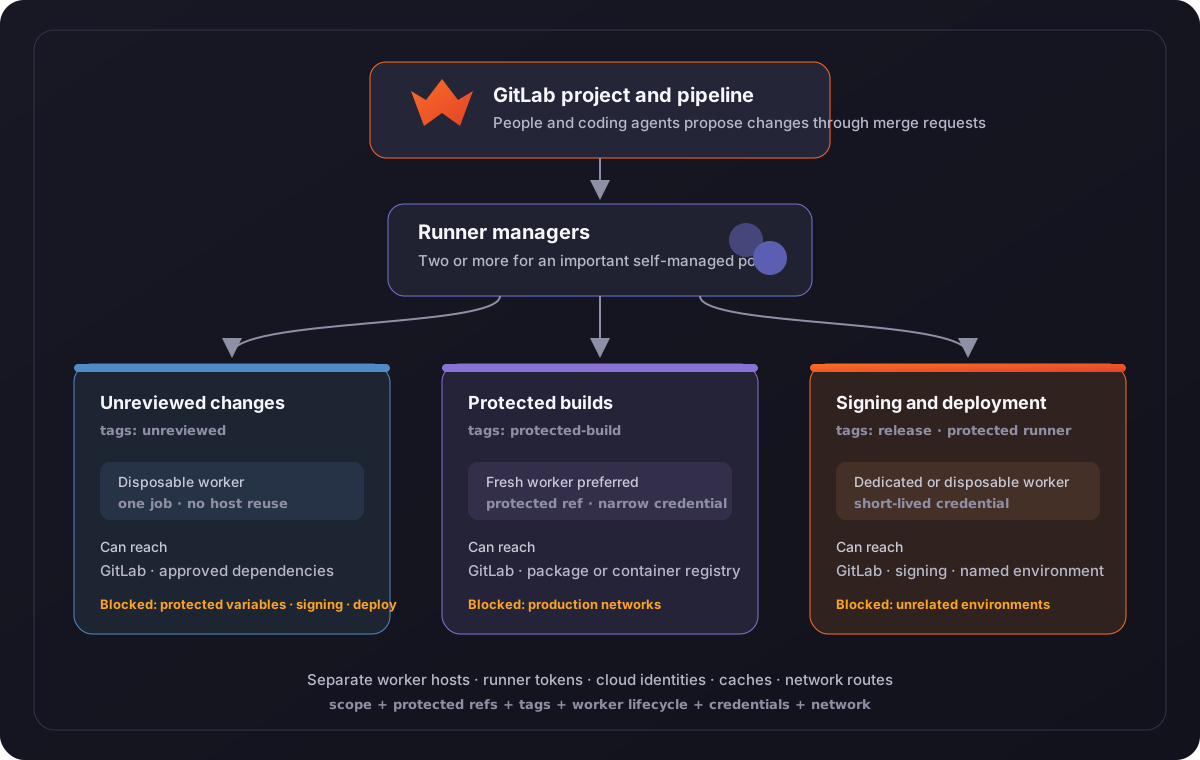
Text description
A person or coding agent proposes a change in GitLab. GitLab creates pipeline jobs and matches each job to a runner using runner scope, protected-ref rules, and tags. Runner managers poll GitLab and provision workers for three separate pools.
The unreviewed-change pool uses disposable workers. Those workers can reach GitLab and approved public dependencies, but they can't receive protected variables or connect to signing and deployment systems. The protected-build pool also favors fresh workers, but it can receive a credential limited to a package or container registry. The signing-and-deployment pool is smaller, marked protected, and limited to the projects and protected refs that own the release path. Its workers receive short-lived credentials and can reach only the named signing service or environment.
The pools don't share worker hosts, local caches, runner authentication tokens, or cloud identities. An important self-managed pool uses more than one runner manager with the same tags, so one manager can be taken out of service without stopping the entire route.
What defines each zone
| Zone | GitLab route | Worker lifecycle | Credentials | Network access |
|---|---|---|---|---|
| Unreviewed changes | Group or project runner; tags such as unreviewed; unprotected refs and merge requests |
One job per virtual machine where practical | Job token and non-protected values needed for tests | GitLab and approved dependency sources; no signing or deployment route |
| Protected builds | Protected group or project runner; tags such as protected-build; protected branches or tags |
Fresh worker preferred for package integrity | Short-lived package or registry credential | GitLab and the intended package or container registry |
| Signing and deployment | Protected project or narrowly shared group runner; tags such as release or an environment name |
Dedicated or disposable worker with controlled images | Short-lived signing or deployment credential for one target | GitLab, the signing service, and the named environment only |
Follow a job through the system
1. A change enters GitLab
A contributor or coding agent pushes a branch and opens a merge request. The repository and merge request remain the place where people review the proposed change. The agent doesn't connect directly to a deployment system through the runner design.
2. GitLab creates the pipeline
Workflow and job rules decide which jobs belong in the pipeline. Protected branch and tag settings help determine whether protected variables and protected runners are available. For merge request pipelines, check the source and target combinations your projects use rather than assuming every protected-target merge request receives the same access.
3. The job asks for a runner
Runner scope decides which instance, group, or project runners the project can use. The job's tags then match it to runners that have every requested tag. Protected or privileged pools should normally leave Run untagged jobs off so an ordinary job can't arrive there by omission.
4. A runner manager accepts the job
The manager polls GitLab with its runner authentication token. For an autoscaled fleet, it asks the infrastructure provider for a worker and waits for that worker to become ready. The manager needs cloud permissions to create and remove workers, so its own host and identity deserve the same care as other infrastructure controllers.
Important self-managed pools work better with at least two runner managers using the same tags. If one manager is patched or fails, the other can continue accepting jobs while capacity is restored.
5. The worker receives only the access for its zone
The worker checks out the repository and receives the variables and job token available to that pipeline. Network rules permit the destinations assigned to the pool. A test worker can download approved dependencies without gaining a route to a signing service. A release worker can reach its environment without gaining broad access to every environment.
For autoscaled unreviewed work, the Instance executor can provide a one-job lifecycle with capacity_per_instance = 1 and max_use_count = 1. The worker is deleted after the job, which prevents a later job from inheriting its checkout, processes, or local credentials.
6. Results return to GitLab
Logs, test reports, scan reports, and artifacts return through the pipeline. Package and deployment jobs publish only to their named targets. The merge request records the checks that ran, while the protected branch and approval path remain responsible for the merge decision.
7. The worker is cleaned up or replaced
Disposable workers are removed after the job. Reusable workers need a deliberate cleanup and patching process, and they fit best when every job using the host is trusted to the same degree. Caches and artifact stores should follow the same separation so an unreviewed job can't replace material later consumed by a protected build.
Plan for failure, recovery, and demand
This design should keep a failure in one pool from changing the access of another. If the release pool is unavailable, release jobs should wait or fail; they shouldn't fall back to the unreviewed pool merely to keep the pipeline moving.
| Event | Expected behavior | Recovery path |
|---|---|---|
| One runner manager stops | The other manager continues accepting jobs for an important autoscaled pool | Replace or repair the manager, confirm its token and cloud identity, then return it to service |
| The cloud provider can't create workers | Jobs remain queued and don't move to a more privileged or less appropriate pool | Check quota, image, network, and provider status; restore capacity; then retry the queued jobs |
| A runner authentication token is exposed | The affected runner is paused or deleted so it can't accept new work | Revoke or rotate the token through the runner creation workflow, replace the manager if needed, and review jobs accepted by that runner |
| A worker is compromised | The job fails or completes on that worker without gaining another zone's network or credentials | Delete the worker, revoke credentials supplied to the job, discard affected caches or artifacts, and rerun on a fresh worker |
| A protected credential is exposed | The credential's limited scope reduces the systems it can affect | Revoke it, inspect the target's activity, correct the job or secret path, and issue a new short-lived credential |
| A release pool reaches capacity | Release jobs queue while ordinary tests continue in their own pool | Add measured idle or maximum capacity, reduce provisioning time, or schedule release demand without broadening the pool's access |
Capacity belongs in the design because long queues invite teams to look for another route. Track queue time, worker provisioning time, job duration, failures, active workers, and idle workers separately for each pool. That helps distinguish a slow job from a pool that's too small or a provider that's slow to create workers.
Idle workers reduce start time but increase cost. One-use workers take longer to provision and may get less value from local caches. Start from representative normal and peak demand, keep enough spare capacity for important paths, and change one autoscaling setting at a time so you can see what improved.
Docker Machine was deprecated in GitLab 17.5 and is scheduled for removal in GitLab 20.0. If an existing pool still uses the Docker Machine executor, plan its move to the Instance or Docker Autoscaler executor rather than making it the foundation of a new zone.
Compare the main alternatives
GitLab-hosted runners for every suitable job
This is the simplest option for GitLab.com or GitLab Dedicated jobs that can use the hosted fleet's images, machine sizes, and public outbound network. GitLab.com hosted workers serve one job and are deleted afterward. Jobs that need a private network, specialized hardware, FIPS-controlled workers, or a custom operating model may still need a pool you manage.
One autoscaled pool for the whole group
One pool can be efficient when every participating project and job needs similar access. It becomes a poor fit when some jobs receive protected credentials or private routes that unreviewed code shouldn't inherit. Adding tags inside one pool doesn't separate worker hosts, cloud identities, or networks unless the infrastructure is also separated.
A project runner for every project
Project runners give each project a narrow audience and clear ownership, but many small fleets can sit idle and require repeated patching, monitoring, and capacity work. Group pools organized by meaningful access differences usually provide a better balance when several projects share the same release or test path.
Reusable static workers
Static workers avoid provisioning delay and can make local caches effective. They suit trusted workloads where teams accept host reuse and maintain cleanup, patching, and resource controls. They aren't a good default for unreviewed code because one job can affect the host or material seen by a later job.
Shell or privileged container jobs
The Shell executor runs with the runner user's permissions, while privileged containers can gain root-level control of the host. Some build systems genuinely need those capabilities. In that case, a dedicated pool on isolated, disposable virtual machines keeps those jobs away from unrelated work.
Kubernetes-based fleets
The Kubernetes executor can fit organizations that already operate clusters and want pod-based scaling. The cluster, node reuse, service accounts, admission controls, network policies, caches, and privileged workloads still need to match the trust zone. A pod name or namespace alone doesn't decide what the job can reach.
Check the design with representative jobs
Use a representative project and harmless test endpoints to walk through the routes before adding more projects. The checks should include paths that are meant to work and paths that are meant to fail.
| Check | A useful result |
|---|---|
| Run an ordinary merge request job | It uses the unreviewed pool, receives no protected variable, and can't connect to the test endpoint protected by the deployment network rule |
| Run a protected package job | It uses the protected-build pool and can publish only to the intended test package or registry location |
| Run a protected deployment job | It uses the release pool, receives a credential limited to the test environment, and can't reach another environment |
| Compare two unreviewed jobs | Each job receives a different one-use worker, and the second worker doesn't contain the first checkout |
| Pause one manager | A second manager with the same tags continues accepting jobs within the expected queue time |
| Revoke a runner token | The retired manager stops accepting new jobs, while runners in other zones continue normally |
| Increase representative demand | Queue and provisioning times remain within the targets chosen for that pool without increasing its access |
Keep the pipeline links, runner IDs, worker IDs, route-test results, and expected failures with the design review. Repeat the affected checks after changing runner scope, tags, protected settings, executor, worker image, cloud identity, network rules, credential delivery, cache, or autoscaling configuration.
An unexpected success on a denied path is a reason to pause expansion and correct the runner, credential, or network route. A failed intended path is usually a capacity or configuration problem; it shouldn't be solved by sending the job through a pool with different access.
Related guidance
- Runner separation by workload trust turns this design into a practical runner inventory, pool-selection method, and set of checks.
- Verified issue to MR provides an agent-assisted change whose merge request jobs can exercise the unreviewed route.
- Teach Duo your project's review conventions shows how to add project context to Code Review Flow before a change reaches the protected merge and release path.
- Evaluate a custom Flow before you adopt it helps compare intentional and automatic Flow triggers before expanding the runner access available to them.
- Security for self-managed runners explains executor risks, shared-host reuse, privileged jobs, network separation, and cleanup.
- Manage runners and configure runners cover runner scope, authentication tokens, protected runners, merge request pipelines, tags, and untagged jobs.
- GitLab-hosted runners explains the hosted fleets and GitLab.com's one-job virtual machines.
- GitLab Runner Autoscaling and the Instance executor cover manager redundancy, autoscaling choices, and one-job instance settings.
- Docker Machine executor explains its deprecation and migration direction.
- GitLab Dedicated for Government secure configuration guide explains the customer's responsibility for FIPS-compliant runners outside the tenant.
- Professional Services runner security and performance guidance contributes the manager, host, network, credential, cleanup, and resource review.
- Professional Services runner autoscaling guide for AWS contributes the workload, peak-demand, idle-cost, queue-time, and one-use-worker method.