
Use a change with known callers to learn what a useful impact report looks like. You'll compare a changed default with a private-helper rename, then run the callers' tests to see whether Duo's explanation agrees with the code.
Prepare the example
The example contains four separate GitLab projects. shared-client exports normalizeAccountId; checkout-service and billing-worker call it; integration-notes only mentions it. The consumer manifests use a local npm dependency on an adjacent shared-client clone. That lets you exercise an unmerged change without publishing a package.
Download the example files from this page and extract the archive. You'll need Python 3.10 or later, Node.js 22 or later with npm, and an authenticated glab connection to GitLab.com. From the extracted directory, preview the setup:
python3 evals/scripts/prepare-example.py --parent-group YOUR-GROUP --name orbit-library-check
The setup helper prints what it would create without writing to GitLab. When the group and name look right, add --apply:
python3 evals/scripts/prepare-example.py --parent-group YOUR-GROUP --name orbit-library-check --apply
This creates a new private subgroup, four private projects, and two open merge requests. It doesn't change group features, merge anything, or overwrite an existing subgroup. If it stops partway through, it prints the subgroup URL so you can inspect what was created; it won't silently reuse it on another run. You can also ask an authenticated agent to run the helper for you after reviewing its preview.
Complete the Orbit and Chat setup for the parent group. Wait for the new projects to be indexed. The helper prints the merge request URLs and the exact search scope to use.
Start with the behavior-changing merge request
Open Trim account identifiers by default in shared-client. Start a new GitLab Duo conversation and use the impact question, replacing the subgroup with the one the helper created.
For the input " ACCT 42 ", the current library returns " ACCT 42 ". The proposed version returns "ACCT 42". The report should connect that change to these two calls:
| Project | What to find | Result with the proposed library |
|---|---|---|
checkout-service |
checkoutRequest calls normalizeAccountId without options in src/checkout.js. |
The returned accountId loses the surrounding spaces. |
billing-worker |
accountLookupKey calls normalizeAccountId without options, then lowercases it in src/worker.js. |
The key changes from " acct 42 " to "acct 42". |
integration-notes |
A README mention, with no importing source file. | No caller has been demonstrated here. |
Open a returned source link and check the call yourself. In the action details, look for an Orbit query restricted to the four projects. A query that searched other groups, or an answer based only on old MR comments, needs another pass even if the project names happen to be right.
Keep the tests focused on what callers expect
Ask the test question in the main guide. Watch for a subtle mistake: Duo may suggest accepting the library's new result without deciding whether it's right for the caller. If that happens, follow up:
Keep the existing expected results until each caller's owner decides whether trimming is acceptable. Please summarize this in a short table: project, source link, current result, proposed result, and the existing test to run. Use the same padded input. Don't add a second assertion that contradicts the existing test. State whether you've run the tests.
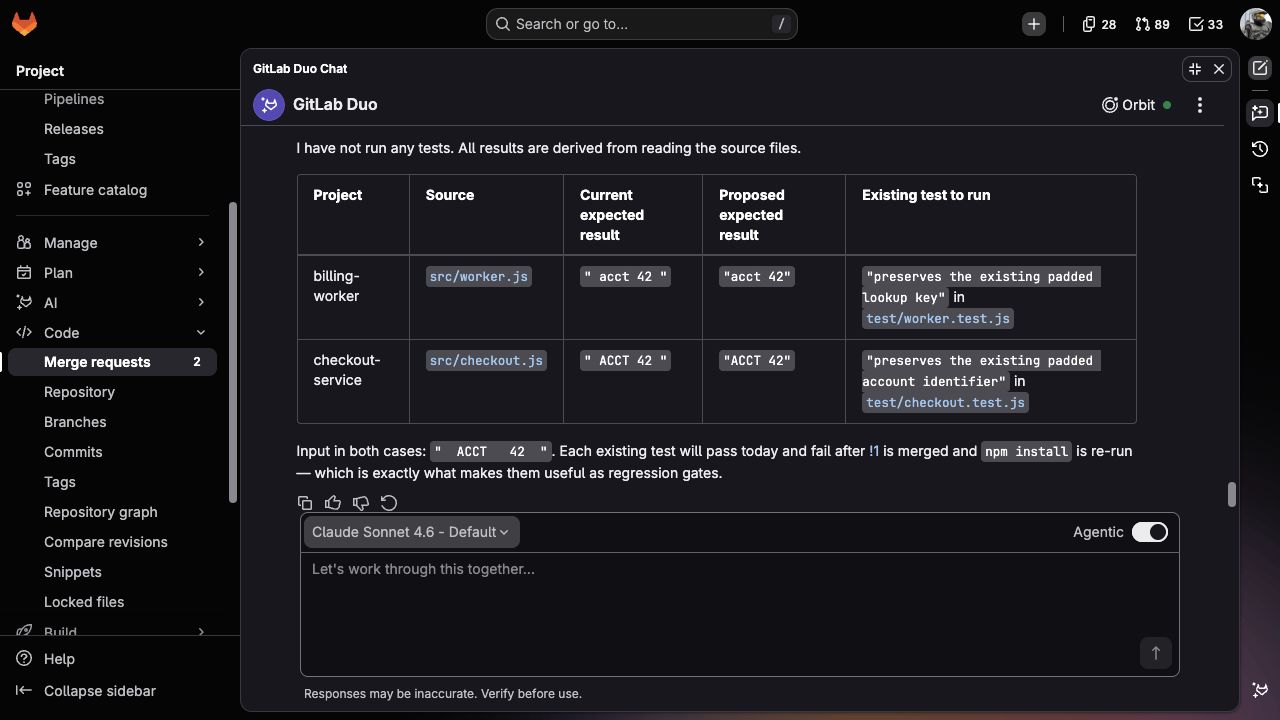
The comparison now points to tests you can run. Read “proposed expected result” as the output of the proposed library, not a reason to change the caller's expectations. And despite the answer's “after merge” wording, you can check the proposed code before merging anything—the next step does exactly that.
Run the checks behind the explanation
From the extracted example directory, run:
python3 evals/scripts/check-example.py --case baseline
python3 evals/scripts/check-example.py --case changed-default
python3 evals/scripts/check-example.py --case private-helper
The checker copies the projects into a temporary directory and installs only the adjacent local package. It doesn't modify your clones or contact GitLab. No npm registry dependencies are needed.
The baseline should pass in all three code projects. With the changed default, the library's updated tests pass, but both callers reject the new default: they still expect the padded identifier. The checker reports those two expected assertion failures as CHANGE OBSERVED, not as passing consumer tests. This tells you the report found a behavior the callers actually exercise.
changed-default: shared-client: PASS (2 tests)
changed-default: checkout-service: CHANGE OBSERVED (1 expected assertion failure, 1 passing test)
changed-default: billing-worker: CHANGE OBSERVED (1 expected assertion failure, 1 passing test)
Both consumer projects also test an input without surrounding spaces. Those checks still pass, so you can see which input reveals the change rather than treating every call as broken.
Compare the private-helper rename
Return to the same conversation and ask about Rename the internal whitespace helper. Replace the subgroup below with yours. Duo can compare this diff with the callers it's already checked; there's no need to start the search again.
Now compare shared-client!2 in my-group/library-check with the callers you've already checked. Read that MR's current diff. Does it change what callers of normalizeAccountId receive? Explain whether checkout-service or billing-worker need any changes. Use the caller files already read in this conversation; don't search other projects. Keep this read-only.
The exported function, its arguments, and its default behavior stay the same. A useful answer explains that the helper isn't exported and leaves the consumers alone. The private-helper check should pass in all three code projects.
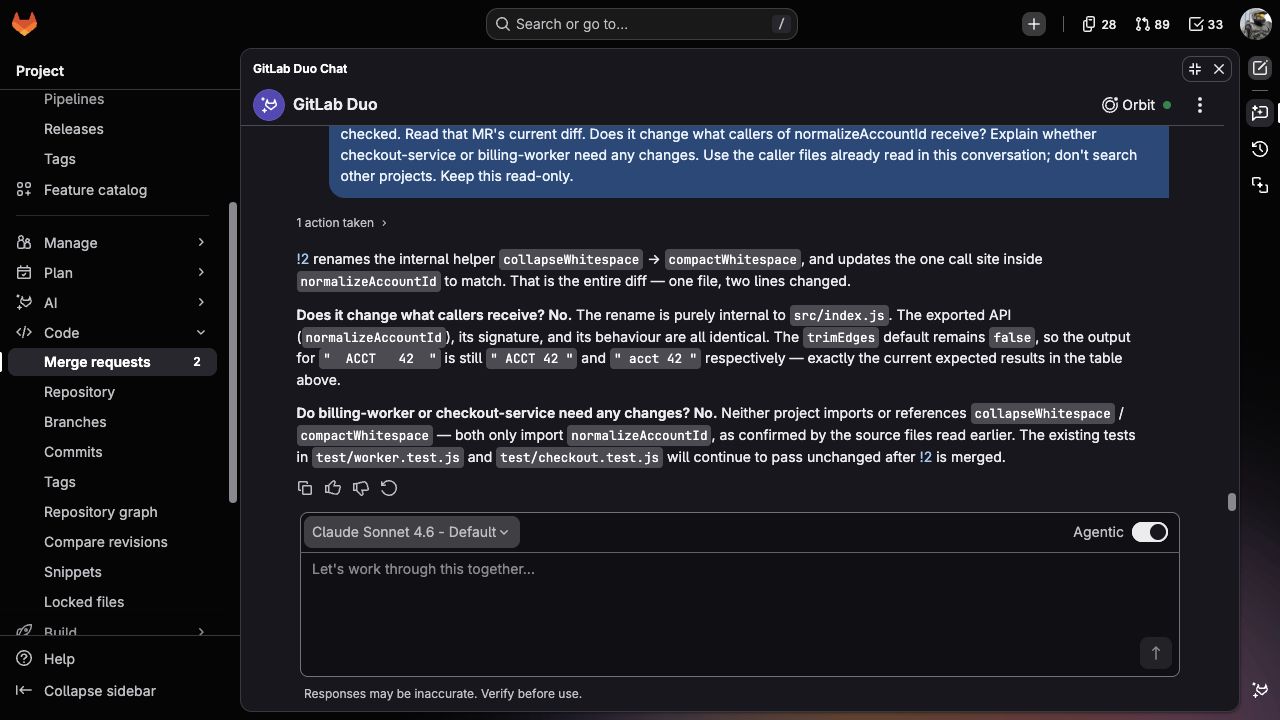
Decide whether the answer is useful
You should be able to follow the answer from the MR diff to a real call, then to a test that exercises the changed result. If it says a merge immediately deploys the library everywhere, ask it to read the dependency setup. If it suggests a datastore migration without finding a datastore, ask it to separate the observed string change from that assumption.
Once the known cases make sense, return to your own MR with a specific subgroup and an input that could expose a compatibility problem. The example projects aren't needed for that conversation.
