
Do you use Python scripts in your GitLab CI pipelines? Do you want to create pipelines at scale? This tutorial shows how to set up your first GitLab CI/CD component to deploy Python scripts.
A CI/CD component is a reusable single pipeline configuration unit. Use components to create a small part of a larger pipeline, or even to compose a complete pipeline configuration.
Prerequisites
- Basic Python knowledge
- Working knowledge of GitLab CI
- 8 minutes
Python script
This Python script utilizes a library called ArgParse . ArgParse allows you to pass variables to script through the command line. This script takes in three arguments: Python_container_image: This is the Python container image you wish to use. Stage: This is the GitLab CI stage in which you job will run in. Name: This is your name.
      import argparse

parser = argparse.ArgumentParser(description='Python CICD Component Boilerplate')
parser.add_argument('python_container_image', type=str, help='python:3.10-slim')
parser.add_argument('stage', type=str, help='Build')
parser.add_argument('persons_name', type=str, help='Noah')
args = parser.parse_args()

python_container_image = args.python_container_image
stage = args.stage
persons_name = args.persons_name
This will take in these three variables and print out simple statements:
      print("You have chosen " + python_container_image + " as the container image")
print("You have chosen " + stage + " as the stage to run this job")
print("Thank you " + persons_name + "! you are succesfully using GitLab CI with a Python script.")
To test this script locally, you can call on the script by utilizing the following command:
python3 src/script.py python_container_image stage name
Modify this script accordingly if you’d like to add in your own arguments!
Template
Note: As long as the gitlab-ci.yml is placed in the templates/directory, the CI/CD component will know to pick it up. We named our template templates.yml, but any name would work for this YAML file.
Now, getting into the fun part of CI/CD components, inputs! Inputs allow you to pass through variables into your pipeline.
      spec:
  inputs:
    python_container_image:
      default: python:3.10-slim
      description: "Define any python container image"
    stage:
      default: build
      description: "Define the stage this job will run in"
    persons_name:
      default: Noah
      description: "Put your name here"
Here we have defined the three inputs that are our arguments in our Python script. You can see for each input we have added in a default value – this will be what the input is set to if not overridden. If we took out this default keyword the input would become mandatory when we use our component. As it is written now, adding in these inputs when we use our component is optional due to our default values.
We can also set descriptions to ensure that other developers can understand what to input when they use our component. Descriptions are optional but they provide self documentation within the code itself, which is always nice.
After we set up our inputs, let’s write the rest of our component:
      component:
  image: $[[ inputs.python_container_image ]]
  stage: $[[ inputs.stage ]]
  before_script:
    - pip3 install -r src/requirements.txt
  script: python3 src/script.py $[[ inputs.python_container_image ]] $[[ inputs.stage ]] $[[ inputs.persons_name ]]
To use inputs in our component, we need to use the syntax $[[ inputs.$VARIABLE ]]. In the above code, you can see that we use inputs to define our image and stage with $[[ inputs.python_container_image ]] and $[[ inputs.stage ]] .
script: python3 src/script.py $[[ inputs.python_container_image ]] $[[ inputs.stage ]] $[[ inputs.persons_name ]]
Diving into the script section, you can see we call upon our Python script.. We are able to pass our inputs in with the help of the ArgParse.
Now that you have reviewed how the Python script works and the template has been set up, it is time to use the component!
Using the component
In order to utilize the CI/CD component we just created, we need to include it in the .gitlab-ci.yml file that is in the root of our directory.
      include:
  # include the component located in the current project from the current SHA
  - component: $CI_SERVER_FQDN/$CI_PROJECT_PATH/template@$CI_COMMIT_SHA
    inputs:
      python_container_image: python:3.11-slim
      stage: test
      persons_name: Tanuki
One way to include it is to call upon it locally in the current project from the current Commit SHA. You can find other ways to reference a component in our documentation.
To override the defaults, we have passed in other inputs so we get the correct image, stage, and name for our job.
Try and change the persons_names to your own and watch the pipeline run!
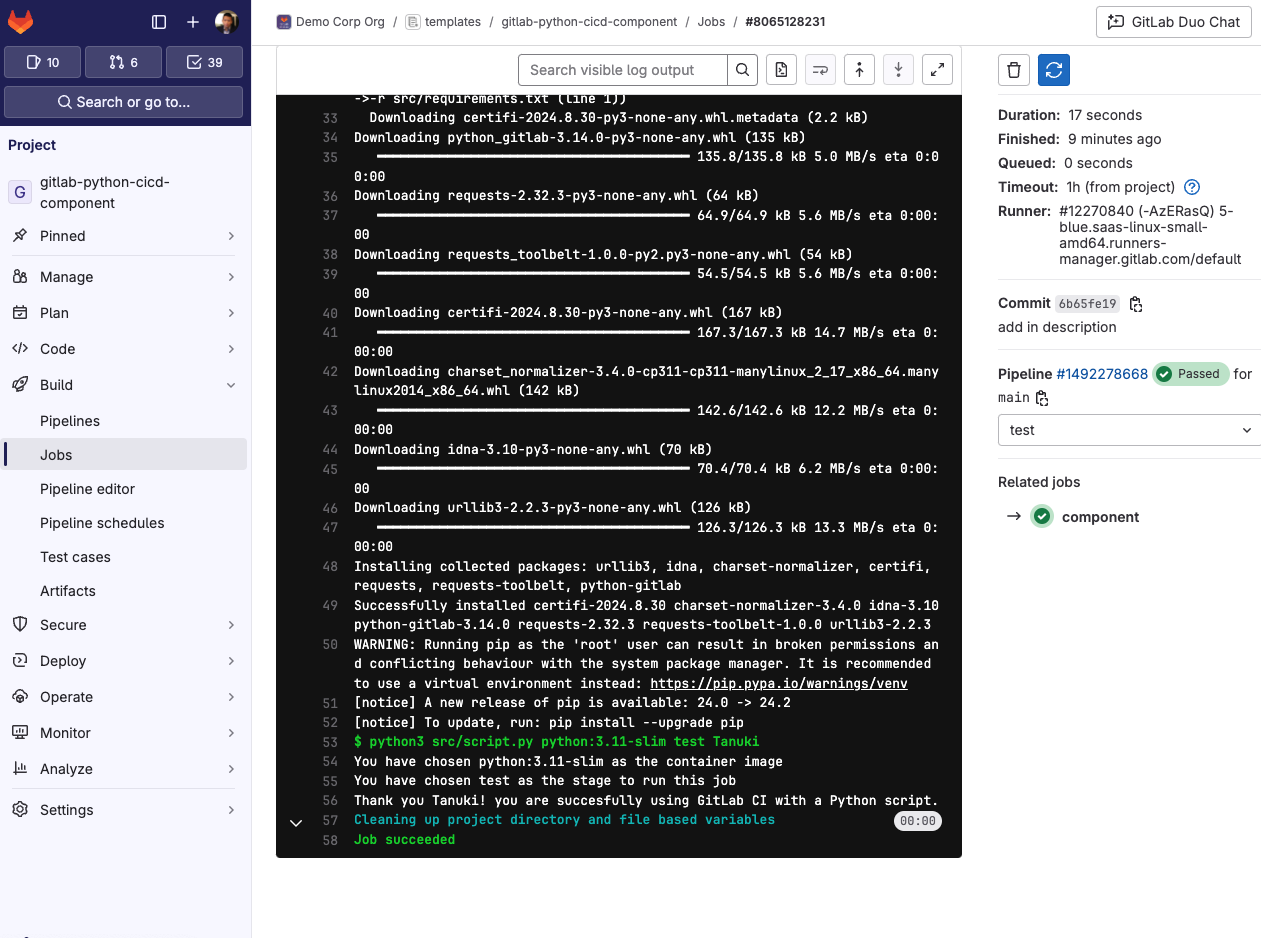
Voila! You have learned how to set up a basic C/ICD component utilizing a Python ArgParse script!
What's next?
In the Python script, there is a commented out GitLab Python library and OS library. If you would like to interact with the GitLab API, you can uncomment these and add in a GitLab personal access token to the CI/CD variables named GLPAT.
      import gitlab
import os
Afterwards you can then interact with the GitLab API.
      glpat = os.environ['GLPAT']

gl = gitlab.Gitlab(private_token=glpat)
# SELF_HOSTED gl = gitlab.Gitlab(url='https://gitlab.example.com', private_token='xxxxxxxxxxxxxx')
try:
   projects = gl.projects.list(get_all=True)
   print(projects)
except Exception as error:
   print("Error:", error)
Learn more about CI/CD components and how to avoid building pipelines from scratch with the GitLab CI/CD Catalog.
Read more
- FAQ: GitLab CI/CD Catalog
- Introducing CI/CD Steps, a programming language for DevSecOps automation
- A CI/CD component builder's journey
FAQ
What is a GitLab CI/CD component?
A CI/CD component is a reusable single pipeline configuration unit that can be used to create a small part of a larger pipeline or to compose a complete pipeline configuration.
What do I need before setting up my first CI/CD component?
You need basic Python knowledge, a working knowledge of GitLab CI, and about 8 minutes to complete the setup.
Where should the template YAML file be placed in a CI/CD component project?
The template YAML file must be placed in the templates/ directory so the CI/CD component knows to pick it up, and any filename will work for that YAML file.
What are inputs in a CI/CD component and why are they useful?
Inputs allow you to pass variables into your pipeline, and each input can have a default value and an optional description to help other developers understand what to provide.
What happens if I don't provide a default value for an input?
Without a default value, the input becomes mandatory whenever the component is used, whereas inputs with default values are optional to override.
How do I reference an input variable inside a component template?
Use the syntax $[[ inputs.$VARIABLE ]] to reference any input within your component's YAML configuration.
How do I include a CI/CD component in my pipeline?
Add an include block to the .gitlab-ci.yml file at the root of your project and reference the component using its path and commit SHA or another supported reference method.
Can I use a CI/CD component to interact with the GitLab API?
Yes, by uncommenting the GitLab Python library in the script and adding a personal access token to your CI/CD variables as GLPAT, you can interact with the GitLab API from within your component.